
Front Desk & check-in QR codes
Front Desk (second entry of the left menu) is your daily hub. It has three tabs:
| Tab | What it shows |
|---|---|
| Hotel Today — Movements | Check-ins, in-house guests and check-outs, rooms to assign, balances, rooms not ready. Only with Dive Resort. |
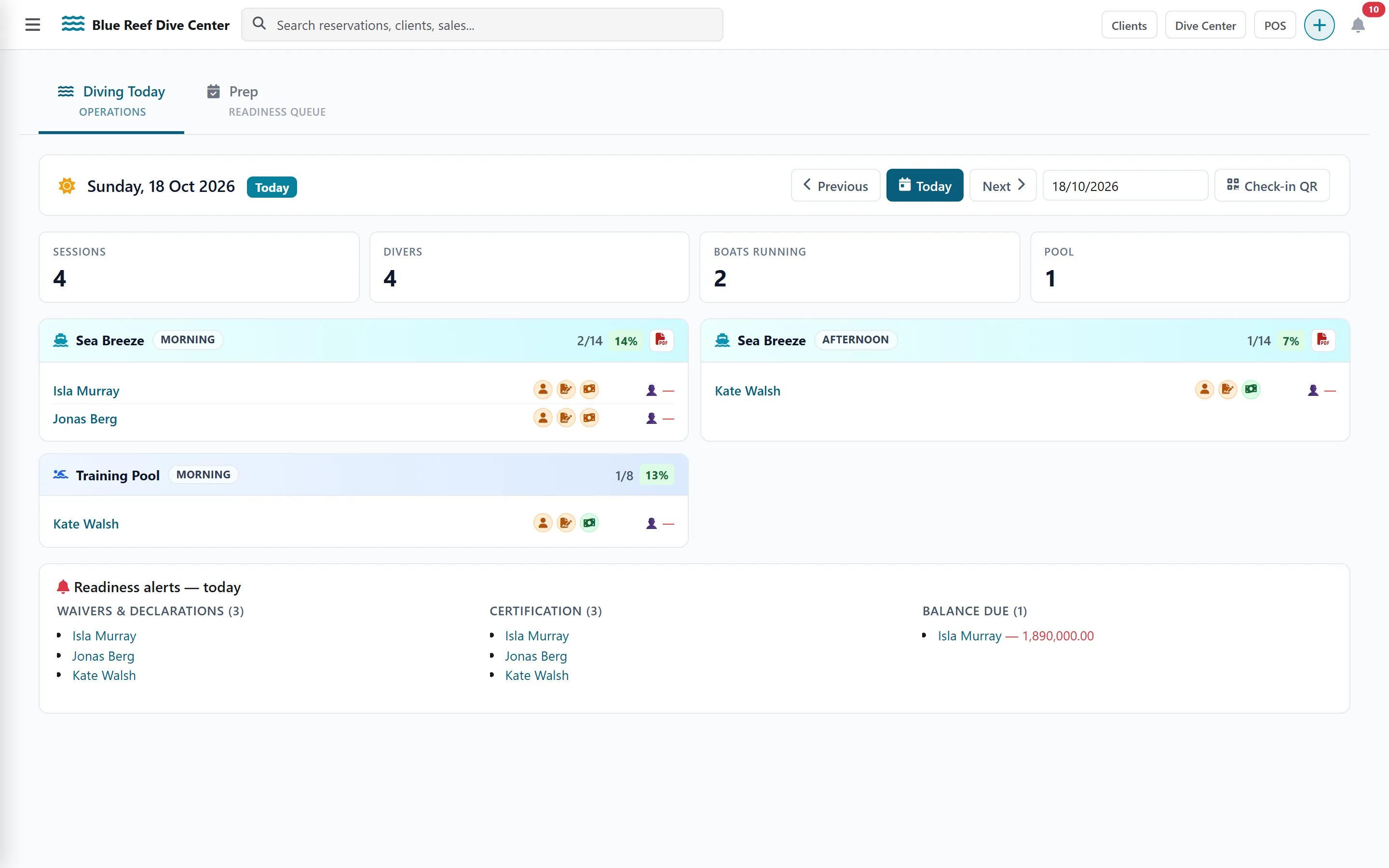
| Diving Today — Operations (opens first) | Every boat, shore point, pool and classroom of the day, its divers and guide, and the readiness alerts |
| Prep — Readiness queue | Upcoming guests whose profile or waivers are missing, and the reminders to send them |
Use Previous, Today, Next or the date picker to change day.
Diving Today
Section titled “Diving Today”Each departure card lists its divers with three icons: profile, waiver and payment. A red icon links straight to what is missing — for example Waivers not signed — open the guest form to sign. Trip Manifest PDF prints the list of divers of a boat and time slot (name, gender, nationality, passport) for park or harbour clearance.
At the bottom, Readiness alerts — today groups the problems: waivers & declarations, certification, balance due.
The check-in QR code
Section titled “The check-in QR code”On the morning of a departure, guests can complete their own forms and sign their waivers on a tablet or their phone.
-
On Front Desk, click Check-in QR. The Departure Check-in Board panel shows a QR code and its link for the selected date.
-
Show the QR code to guests, or click Open to display the board on a tablet at the desk. Copy copies the link to send it.
-
On the board, guests see the first names of the day’s divers, with a green or red Waiver and Profile chip.
-
A guest taps their name, confirms it is them by typing their last name, and lands on their own form to complete their profile and sign their waivers.
Prep: chase missing information before arrival
Section titled “Prep: chase missing information before arrival”The Prep tab (Pre-Arrival Hub) lists upcoming guests with their profile and waiver status. Choose Dive days within (1 month or all upcoming) and tick Needs action only.
- Relance emails a guest the link to their pre-arrival form.
- Relance all does it for every incomplete guest of a day, skipping anyone emailed in the last 72 hours.
- Review opens a side panel to check a guest’s profile, send a reminder or validate everything.
The registration form QR code (walk-in guests)
Section titled “The registration form QR code (walk-in guests)”For guests who are not booked yet — walk-ins, a group arriving together — use the general registration form.
-
Open Clients in the top bar and click External Form.
-
Share the Direct Link, Open Form on a tablet, or Share via WhatsApp.
-
Or print the QR code: Download SVG (any size) or Download PNG (high resolution), for example on a sign at the desk.
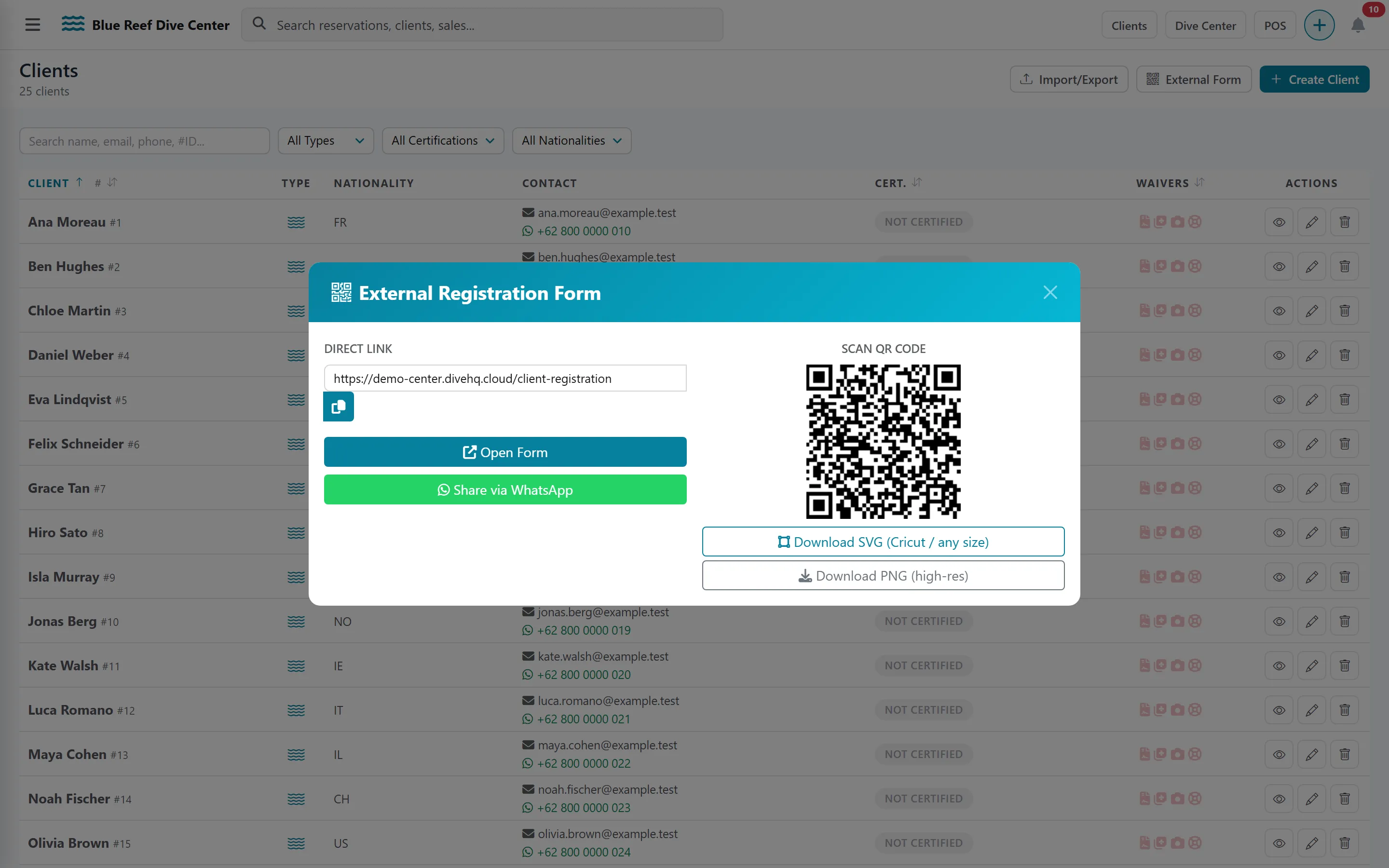
The guest fills in their name, contact, passport, nationality, certification and emergency contact, and their client record is created. This form has no waiver: send waivers afterwards from the client’s page (see Waivers).